

Creating professional-looking images no longer requires advanced Photoshop skills or hours spent searching through stock photography libraries. With ChatGPT, you can describe what you want in ordinary language and generate everything from realistic photographs and illustrations to website banners, social media graphics and detailed infographics.
But there is a difference between generating an image and creating an image that's genuinely worth using. A vague instruction might produce something attractive but generic. A carefully structured prompt can give you control over composition, lighting, colours, style, subject matter and the intended audience.
In this guide, we'll walk through how to create images with ChatGPT step by step, explore the different types of visuals it can produce, share practical prompts — and a free interactive prompt generator — and explain how writers, SEO professionals and marketing agencies can incorporate AI-generated images into their workflows. We'll also cover image optimisation, Google's guidance on AI-generated content and the mistakes worth avoiding before publishing your images online.
To create an image with ChatGPT: open chatgpt.com, describe the subject, environment, style, lighting and format you want, then refine the result with follow-up instructions. Image generation is available on the free tier, with higher limits on paid plans.
What Is ChatGPT Image Generation?
ChatGPT image generation is a feature that allows you to create and edit visual content using written instructions. Instead of manually drawing an illustration or assembling a design, you describe the result you want. ChatGPT then uses an image generation model to produce a new visual based on your instructions.
For example, you could enter:
Create a photorealistic image of a modern coworking office overlooking London at sunrise. Include large windows, minimalist furniture and warm natural lighting. Use a professional commercial photography style with a 16:9 aspect ratio.
ChatGPT interprets those instructions and generates an image. You can then refine it through additional requests, such as changing the lighting, removing furniture or adjusting the colour scheme. You can also upload existing images and request modifications.
According to OpenAI's official image generation documentation, ChatGPT supports image creation, editing, transparent backgrounds, text within images and different aspect ratios. Some capabilities and editing options depend on the interface and account.
The important distinction is that ChatGPT isn't simply searching an image library. It can generate new visual compositions based on your descriptions.
How to Create an Image with ChatGPT: Step by Step
You don't need to know graphic design terminology to begin. However, a few simple techniques will dramatically improve the results.
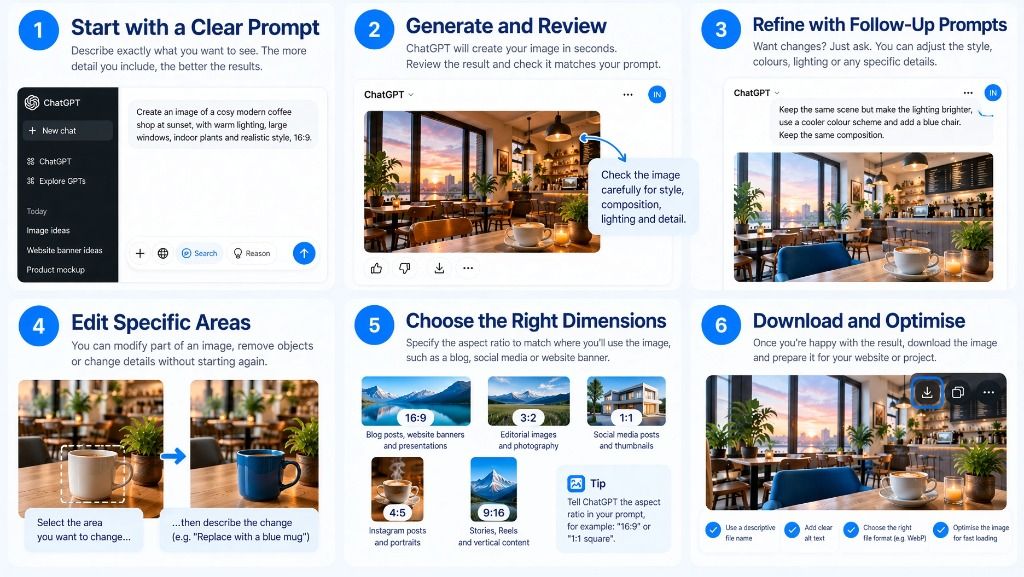
Step 1: Open ChatGPT and Describe Your Image
Visit chatgpt.com and open a conversation. You can ask ChatGPT to create an image directly in the message field. Alternatively, access the Images feature through the available navigation options.
Start with a short description explaining what you'd like to create. For example:
Create an image of a cosy modern coffee shop at sunset, with large windows, warm lighting, indoor plants and comfortable seating. Photorealistic architectural photography, landscape 16:9.
Notice how the prompt includes more than the subject. It also describes the environment, lighting, artistic style and format. Five useful elements of a strong prompt:
- Subject: What should appear in the image?
- Environment: Where is the subject located?
- Style: Should the image be photographic, illustrated or something else?
- Mood and lighting: What atmosphere are you trying to create?
- Format: What shape or composition do you need?
Not every image needs an elaborate description. OpenAI's image prompting guidance explains that a few clear sentences can often be enough.
Step 2: Generate and Review Your Image
Submit your prompt and ChatGPT will begin generating the image. Generation time varies depending on the complexity of the request and the service's current availability.
Once the image appears, examine it carefully. Ask yourself:
- Does it match the intended subject and style?
- Is the composition suitable for where it will appear?
- Are important objects positioned correctly?
- Does the lighting look natural?
- Is any generated text spelled correctly?
- Are there strange details, distortions or unwanted objects?
For commercial work, don't assume the first result is automatically ready for publication. A visually impressive image can still contain problems that become obvious when viewed at full size.
Step 3: Refine the Image Using Follow-Up Prompts
One of ChatGPT's most useful capabilities is conversational image editing. You don't necessarily need to start again whenever something looks wrong.
For example, if the coffee shop image is too dark, you might say:
Keep the same coffee shop and overall composition, but brighten the interior with softer natural light. Preserve the furniture, window arrangement and realistic photographic style.
Or perhaps the image looks too artificial:
Make the lighting more natural and reduce the overly polished appearance. Add realistic surface textures, subtle imperfections and believable shadows. Keep the same scene and camera angle.
This approach gives ChatGPT a clearer editing objective.
Tip: Change one or two things at a time. If you simultaneously request a different composition, lighting setup, camera angle and artistic style, it may become difficult to preserve the elements you already liked.
Step 4: Edit Specific Areas of an Image
ChatGPT also supports editing particular parts of an image. Depending on your interface, you can select an image, highlight an area using the selection tool and describe the changes you want.
For example, imagine you've created a photograph of a modern desk with a laptop, but you want to change the coffee mug. You could highlight the mug and enter:
Replace the white coffee mug with a simple matte navy-blue ceramic mug. Keep the desk, laptop, lighting and everything else unchanged.
Alternatively, describe the edit in the conversation without highlighting a specific region. Useful editing requests include:
- Removing an unwanted background object.
- Replacing furniture or decorations.
- Changing the colour of an item.
- Adding or removing visual elements.
- Modifying the background.
- Improving the lighting or composition.
- Creating a transparent background.
Edits aren't always perfectly isolated. Inspect surrounding details to ensure that something important hasn't changed.
Analyze Your Backlink Profile
Get detailed insights into your backlink quality with Moz, Ahrefs & Majestic data combined.
Step 5: Choose the Right Image Dimensions
Different publishing platforms need different image shapes. ChatGPT supports aspect-ratio instructions, and its image interface provides aspect-ratio controls.
| Aspect ratio | Common uses |
|---|---|
| 16:9 | Blog images, website banners, presentation graphics |
| 3:2 | Editorial photography, product lifestyle images |
| 4:3 | Website illustrations, educational visuals |
| 1:1 | Social graphics, thumbnails, square illustrations |
| 4:5 | Instagram feed posts and promotional imagery |
| 9:16 | Stories, Reels covers and vertical social content |
The aspect ratio describes the relationship between width and height, not necessarily the final pixel dimensions. When creating a website image, leave space for cropping where necessary. Important text, faces and objects should not sit too close to the edges.
Step 6: Save and Prepare the Image for Publication
Once you're happy with the result, open the image and use the available download or save option. Before publishing it on a website, consider whether the downloaded file needs resizing, cropping or compressing. For instance, a large PNG might be suitable for editing, but an optimised WebP or AVIF version may be preferable for website performance when your publishing system supports it.
Use descriptive filenames instead of leaving images with generic names. A useful example: chatgpt-modern-coffee-shop-example.webp. Also write meaningful alternative text to describe the image — we'll explore image SEO in more detail later in this guide.
What Types of Images Can ChatGPT Create?
ChatGPT can produce a surprisingly broad range of visual content. The best image type depends on whether you are trying to explain something, sell a product, communicate an idea or simply make a piece of content more engaging.
| Image type | What you can create | Ideal applications |
|---|---|---|
| Photorealistic images | Realistic interiors, landscapes, objects and fictional scenes | Articles, websites, campaigns |
| Illustrations | Flat illustrations, editorial artwork and stylised scenes | Blog content, explainers |
| Infographics | Visual processes, comparisons and simplified concepts | SEO content, educational guides |
| Diagrams | Flowcharts, workflows and conceptual systems | Tutorials, technical content |
| Website mockups | Landing page concepts, dashboards and interfaces | Client presentations, design ideation |
| Product mockups | Conceptual packaging, product scenes and lifestyle imagery | Ecommerce concepts, campaigns |
| Social graphics | Promotional images, posters and campaign artwork | Social media marketing |
| Icons and visual assets | Simple symbols, badges and design concepts | Websites, presentations |
| Character artwork | Fictional people, mascots and stylised characters | Branding, storytelling |
| Background images | Patterns, textures, abstract artwork and transparent assets | Web design, marketing |
Some outputs need more review than others. For example, ChatGPT may produce an excellent editorial illustration from a short prompt, whereas a technically accurate diagram with dozens of labels may require further editing.
1. Photorealistic Images
Photorealistic generation is particularly useful when a website needs a specific visual that would otherwise be difficult to photograph. You might need an image of a futuristic office, a particular workspace arrangement or an illustrative lifestyle scene.
Create a realistic editorial photograph of a freelance writer working from a bright home office. Include a wooden desk, laptop, notebook, coffee cup and leafy plants. Soft morning sunlight through a large window, authentic atmosphere, natural colours, professional photography, 16:9. No text or logos.
A realistic image does not mean a real event or location was photographed. Avoid presenting generated imagery as documentary evidence.
2. Blog Featured Images
A featured image helps communicate an article's topic before the reader begins reading. For SEO and marketing publications, the best featured images often combine a clear visual concept with a consistent brand identity.
For an article about artificial intelligence in marketing, for example:
Create a sophisticated editorial featured image about AI-driven digital marketing. Show an abstract network of search results, connected content nodes and analytics visualisations. Use a refined navy, blue and white colour palette, subtle depth, minimal clutter and an elegant technology aesthetic. Wide 16:9 composition, with no text, logos or fake statistics.
This creates a recognisable visual direction without relying on the familiar stock image of a robot using a laptop. If you're redesigning your homepage, our guide to what makes an effective website hero section explores how imagery and other design elements work together.
3. Infographics and Educational Diagrams
Infographics are especially interesting for content publishers because they can communicate information in ways that ordinary paragraphs cannot. Examples include SEO audit workflows, content marketing processes, customer journey explanations, step-by-step software tutorials, comparisons of marketing channels, timelines of technology developments and visual glossaries of technical terms.
Design a professional educational infographic showing the five stages of an SEO content workflow: keyword research, search intent analysis, content creation, on-page optimisation and performance monitoring. Use five connected horizontal cards, simple icons, navy headings, bright blue accents and a white background. Include only the five stage names. Make the layout easy to read at desktop and mobile sizes.
Infographics can be visually attractive, but their factual accuracy is your responsibility. For statistics, dates, formulas and technical diagrams, verify the content against reliable sources. A generated graphic should never be treated as evidence that a statistic is correct. For particularly complex diagrams, it may be more reliable to generate a visual concept with ChatGPT and assemble the final labelled graphic in a design application or using HTML/SVG.
4. Website and Landing Page Concepts
ChatGPT can help designers and agencies explore potential visual directions before committing to a full build. You could generate concepts for hero sections, dashboards, SaaS websites, agency homepages and promotional landing pages.
Create a visual concept for a premium B2B SEO agency homepage. Use a modern white background, deep navy typography, electric-blue accents, generous whitespace and a professional dashboard-style hero illustration. Include a navigation bar, headline area, call-to-action buttons, trust indicators and service cards. Present it as a polished desktop website mockup.
However, an image of a website is not the same as a functional website. Generated interfaces are design references. Developers still need to implement the layout, responsive behaviour, accessibility and functionality.
5. Product Concepts and Mockups
Product imagery is another useful application. You could place a concept product inside a lifestyle scene, explore alternative packaging or develop an initial visual direction for a campaign.
Create a premium studio product photograph of a fictional navy-blue reusable water bottle on a light stone pedestal. Soft natural shadows, minimal background, realistic materials, commercial product photography, 4:5 portrait composition. No brand name or text.
For a real product, use actual product photographs as references and ensure the generated result accurately represents what customers will receive. Don't invent product features, packaging details or accessories that do not exist.
How to Write Better ChatGPT Image Prompts
The quality of an image depends partly on how clearly you communicate the intended result. A simple structure can help:
You won't need every element for every task, but this formula provides a useful starting point.
Weak Prompt vs Strong Prompt
Weak prompt: "Make an image about SEO." The problem is that SEO is an abstract concept — ChatGPT has to guess how to represent it visually.
Better prompt:
Create a modern editorial illustration showing how search engine optimisation connects website content, technical performance and authoritative backlinks. Use three visually distinct interconnected sections, subtle analytics motifs and a clean professional design. White background, navy typography accents and vibrant blue highlights. Wide 16:9 format. No text or logos.
The stronger version provides a clear subject, visual structure, style and practical output requirements.
Authority Link Building
Monthly retainer combining Blogger Outreach, Link Insert and Digital PR placements. Track everything via your live dashboard.
Five Advanced Prompting Techniques
1. Describe the composition. Tell ChatGPT where elements should appear. For example: "Position the main subject on the right third of the image and leave uncluttered space on the left for a website headline." This is particularly useful when creating banners and marketing graphics.
2. Specify the lighting. Lighting can dramatically change an image's appearance. Try descriptions such as soft daylight from the left, warm golden-hour lighting, overcast natural light, clean studio lighting or subtle cinematic backlighting.
3. Explain what must stay unchanged. When editing an existing image, preservation instructions are useful. For example: "Change only the wall colour from white to navy. Keep the furniture, perspective, camera position and all other details unchanged."
4. Use reference images. Upload a design or photograph and explain how it should influence the result: "Use the first image as a reference for colour palette and typography style. Use the second image as a reference for layout. Create an original infographic about website performance, without copying either design directly." Only use reference imagery when you have the appropriate rights and permissions.
5. Limit text within images. ChatGPT can generate text inside images, but long paragraphs, complex charts and dense tables are more likely to contain errors. For professional content, keep on-image wording concise and verify every heading, figure and label.
AI Image Prompt Generator
Create better images with ChatGPT. Customise your prompt below — it updates live — then copy it in one click.
Practical ChatGPT Image Prompts You Can Copy
These examples cover common tasks for bloggers, marketers and agencies.
SEO Article Illustration
Create a professional editorial image showing the relationship between technical SEO, high-quality content and backlinks. Use three connected visual pillars, abstract website elements and subtle search analytics motifs. Clean white background, deep navy and bright blue accents, sophisticated B2B marketing style, landscape 16:9. No text, logos or invented statistics.
Blog Featured Image
Create an original featured image for an article titled "The Future of Search Engines". Show an abstract search interface transitioning into a network of connected AI-generated answers and information sources. Modern editorial artwork, blue and white colour palette, premium tech publication aesthetic, 16:9. Do not include text.
Build E-E-A-T Authority
Expert quotes via Digital PR — your spokesperson quoted in DR 50+ publications.
LinkedIn Marketing Graphic
Design a professional LinkedIn image illustrating how content marketing supports business growth. Use a central content hub connected to website traffic, audience engagement and lead generation. Minimal typography, simple visual hierarchy, navy and blue palette, square composition. Do not invent numerical results.
Digital PR Campaign Illustration
Create a premium editorial illustration of a digital PR campaign connecting a company spokesperson, journalists and online publications. Represent the relationships using clean connected nodes and realistic publishing motifs. Professional agency presentation style, navy and electric blue, white background, landscape 16:9. No publication logos or invented media coverage.
Before-and-After Website Concept
Generate a side-by-side comparison of a dated business website concept and a modern redesigned version. Keep the fictional company name, purpose and content consistent. The left side should have cluttered navigation and outdated visual hierarchy. The right side should have clear typography, improved spacing and modern design. Label the concepts "BEFORE" and "AFTER".
Educational Process Diagram
Design a clear five-step visual explaining how a blog article goes from research to publication: research, outline, writing, editing and publishing. Use five distinct stages, blue connecting arrows, simple relevant icons and short headings. Modern editorial infographic style, white background, navy headings, 16:9.
How SEO Agencies Can Use ChatGPT Image Generation
For SEO agencies and content teams, the real opportunity isn't simply generating cheap decorative images. It's producing useful, relevant visual assets that make content clearer, more distinctive and easier to understand. Here are some of the most practical applications.
Creating Custom Images for Client Blog Posts
Agencies managing multiple websites often need a consistent supply of illustrations. Stock photography can be useful, but it doesn't always match the subject of a specialist article. Consider a detailed guide explaining backlink evaluation: a generic photograph of someone looking at a computer tells the reader very little, whereas a carefully designed illustration showing referring domains, topical relevance and link placement can reinforce the explanation.
ChatGPT can help develop those visual concepts quickly, allowing editors to focus on accuracy and usefulness. However, it is worth remembering that AI-generated visuals do not automatically make content original or informative. Their value depends on whether they genuinely explain or support the topic.
Creating Visual Assets for Digital PR
Digital PR campaigns often benefit from distinctive visual material — original research summaries, survey-result visualisations, educational infographics, timeline graphics, conceptual illustrations and expert commentary cards. Suppose an agency conducts an original survey of 500 businesses about how they use AI: the results might be interesting, but a well-designed visual summary could make the findings more accessible to journalists and readers. ChatGPT could help design the layout and visual style. The figures must still come from the actual research.
Importantly, an infographic by itself does not guarantee backlinks or coverage. The underlying information needs to be interesting, credible and relevant to the publication being approached. Our complete guide to blogger outreach explains how to develop useful resources and approach suitable publishers.
Supporting Link-Worthy Content
One of the more promising applications of AI image generation is creating visuals that support genuinely useful resources. For example, you might publish a detailed SEO terminology guide with custom diagrams, a research report containing verified charts, a practical tutorial with annotated screenshots, an industry timeline featuring accurate historical information, or an original framework that simplifies a complex subject.
These assets can make a resource easier for other writers to reference. However, a polished image isn't a substitute for original information — there is an important distinction between a visually attractive infographic repeating common knowledge and an original resource that actually teaches something new. Our article on backlinks versus content and what influences rankings explores why useful content and effective promotion should work together.
Maintaining Visual Consistency Across Clients
Agencies can also use ChatGPT to develop repeatable visual specifications. For example, a client might require navy-blue headings, blue accent colours, white backgrounds, rounded information panels, consistent illustration styles and minimal embedded text. Instead of describing the design from scratch each time, create a reusable visual brief:
Create an original editorial illustration using our established visual style: white and very light blue backgrounds, deep navy, bright blue accents, bold modern sans-serif typography, rounded panels and clear visual hierarchy. The subject is [TOPIC]. Keep the design professional, uncluttered and appropriate for a B2B audience. Use a 16:9 landscape layout. Do not add unnecessary decorative elements or unsupported statistics.
A human designer should still review consistency across the complete set. For highly controlled brand elements, use your actual brand assets rather than expecting the model to recreate exact logos or typography from memory.
How Writers and Publishers Can Benefit
Bloggers, freelance writers and independent publishers can use ChatGPT in slightly different ways. A writer might want a custom feature image that represents an unusual topic, while a publisher may need dozens of visual assets across different content categories. The challenge is maintaining quality without turning every article into a collection of generic AI images.
Illustrate Difficult Ideas
One of the strongest uses is explaining something that would otherwise require several paragraphs. For example, a guide about website crawling could include a diagram of how a search engine discovers pages through internal links. An article about content marketing could feature an illustration of a content distribution workflow. A technical article could use a conceptual system diagram. For factual diagrams, generate the visual structure, then verify and correct the labels and relationships.
Create Consistent Editorial Series
Writers producing a series of related articles can maintain a consistent presentation. For example, an SEO publication might use blue and navy diagrams for technical tutorials, photorealistic imagery for business case studies, minimal editorial illustrations for opinion articles and structured information graphics for research reports. The goal should be to create a recognisable publication identity, not make every article visually identical.
Refresh Older Content
Existing articles sometimes contain outdated, low-resolution or poorly matched illustrations. ChatGPT can help develop replacement concepts for these visuals. However, don't replace genuine screenshots, photographs of actual events or evidence-based graphics with invented images if doing so would mislead readers. For example, a tutorial on using Google Search Console should normally show the real interface, not an AI-generated imitation.
Are AI-Generated Images Good for SEO?
This is an important question, especially for agencies publishing content at scale. Google does not impose a blanket ban on AI-generated images — its guidance on generative AI content focuses on accuracy, usefulness, quality and relevance rather than treating the use of AI as an automatic reason to reject content.
However, creating an image with ChatGPT does not automatically improve a page's rankings. An AI-generated visual has to serve the same basic purpose as any other image: help users understand, evaluate or engage with the content.
1. Use Images That Match Search Intent
A page explaining how to create images with ChatGPT should ideally contain real tutorials, accurate interface examples and demonstrations of different image types. An unrelated abstract illustration might look attractive, but it isn't nearly as useful as a practical example. A good rule is to ask: does this image help the reader understand something they came to learn? If the answer is no, consider whether the image is needed.
2. Write Descriptive Alt Text
Alternative text supports accessibility and helps search engines understand the image's content. For example:
Poor alt text: AI image SEO ChatGPT best image creation SEO tool
Better alt text: ChatGPT-generated illustration of a modern office with blue walls and natural lighting
Avoid filling alt attributes with repetitive keywords. Google specifically recommends descriptive, relevant alt text in its image SEO best practices. Decorative images may be better suited to empty alt attributes when they add no meaningful information.
3. Optimise File Names and Formats
Use short, descriptive filenames like chatgpt-image-generation-tutorial.webp and avoid meaningless names like image-2394-final-new.png. Choose a format appropriate for your publishing system and test compression against visual quality. WebP and AVIF can provide efficient image delivery, while PNG is often helpful for graphics requiring lossless quality or transparency.
4. Keep Images Close to Relevant Text
Place an image near the paragraph or heading that explains it. For instance, if you're demonstrating how to refine a generated image, show the original and revised versions directly beneath that section. This helps readers understand why the image is there — and it gives search engines contextual information about the image.
5. Maintain Good Page Performance
Large image files can increase loading times. Compress images, serve appropriately sized files and use responsive image delivery. Consider lazy loading images below the fold, while avoiding unnecessary delays for the page's main visible image. The correct approach depends on your website architecture and performance requirements.
6. Use Structured Data Appropriately
Depending on the page, relevant structured data can help search engines understand the content and its associated imagery. For articles, correctly implemented Article or BlogPosting structured data can reference an appropriate featured image. Image metadata may also provide attribution and licensing information where applicable — refer to Google's image metadata documentation. For more general optimisation advice, read our existing guide to optimising website images for SEO.
Can You Use ChatGPT-Generated Images Commercially?
ChatGPT-generated images can generally be used for commercial projects, subject to the applicable OpenAI terms, usage policies and other relevant legal obligations. OpenAI's own image creation guidance also notes that attribution to OpenAI is optional. However, commercial use introduces considerations beyond whether an image can be downloaded. Before using AI imagery commercially, check the following:
- Trademark and branding issues: avoid creating graphics that misleadingly imply endorsement by another company.
- People and likenesses: be careful with identifiable individuals and obtain appropriate permissions.
- Accuracy: don't depict fictional events as if they really happened.
- Product representation: ensure images don't misrepresent products or services.
- Client requirements: follow contractual guidelines about AI-generated assets and disclosure.
- Third-party rights: review intellectual property and licensing considerations where relevant.
Permission to use a generated image commercially does not automatically mean every visual element is legally risk-free or that copyright protection is guaranteed in every jurisdiction. For regulated industries or high-profile campaigns, professional legal review may be appropriate.
Common ChatGPT Image Generation Mistakes
Even impressive-looking images can be unsuitable for publication. Here are some of the most common issues.
Mistake 1: Writing Prompts That Are Too Vague
A prompt like "create a marketing image" gives little control over the result. Explain the actual subject, intended audience, format and purpose.
Mistake 2: Adding Too Much Text
Image generators have improved at rendering typography, but errors can still occur. Keep text short and check spelling, spacing and accuracy. For text-heavy educational graphics, consider adding the final labels in a dedicated design tool.
Mistake 3: Generating Fake Statistics
Never ask ChatGPT to create a statistical infographic without supplying verified figures. An attractive graph containing invented numbers can undermine an entire article's credibility.
Mistake 4: Using the Wrong Aspect Ratio
A portrait image may look excellent in isolation but be unsuitable for a wide website banner. Choose the destination format before beginning.
Mistake 5: Ignoring Brand Consistency
Using an entirely different colour palette and illustration style for every article can weaken a publication's identity. Create repeatable design guidelines and reference them when prompting.
Mistake 6: Publishing Unchecked Images
AI-generated photographs can contain unrealistic physical details, strange reflections or inconsistent objects. Illustrations and diagrams may contain incorrect relationships. Review everything at full size.
Mistake 7: Assuming AI Imagery Automatically Improves Rankings
Google does not reward a page simply because its images were created using an AI tool. Images should improve the usefulness of the content. Relevant internal links, sound technical SEO, accurate information and a positive page experience still matter.
ChatGPT Image Generation: Frequently Asked Questions
Can I generate images with ChatGPT for free?
Yes. OpenAI makes image generation available across ChatGPT tiers, including the free tier. Free users may encounter stricter usage limits than paid subscribers. Check OpenAI's current image generation documentation for the latest availability details.
Can ChatGPT edit an existing photograph?
Yes. You can upload an image and describe the changes you want. Depending on the interface, you may also be able to select specific areas for targeted edits.
Can ChatGPT create transparent backgrounds?
Yes. You can request a transparent background, although you should check the exported image to confirm the transparency is correct.
Can ChatGPT create logos?
ChatGPT can help develop logo concepts and visual ideas. However, a generated image is not necessarily a production-ready logo. Professional logos often need vector artwork, precise typography, consistent proportions and trademark clearance.
Can ChatGPT create infographics?
Yes. ChatGPT can create infographic-style images, educational diagrams and visual explainers. For fact-heavy designs, always supply accurate information and verify the finished result.
Can ChatGPT make images for blog posts?
Yes. Featured images, editorial illustrations, diagrams and explanatory graphics are all practical applications. Choose visuals that genuinely support the article rather than adding generic decoration.
Can I use ChatGPT images on a client's website?
Generally, yes — subject to applicable terms, intellectual property considerations and the client's requirements. Always review the asset for factual accuracy, brand consistency and any misleading elements before publishing.
Does Google penalise AI-generated images?
Google does not have a blanket policy penalising images solely because they were generated by AI. However, Google's broader content and spam policies still apply. Low-value or misleading content remains a concern regardless of how it was created.
Should I disclose that an image was AI-generated?
Disclosure may be appropriate where it helps readers understand what they're seeing, particularly for realistic images that could be mistaken for photographs of actual events. Some industries and platforms have additional disclosure requirements.
What's the best prompt for ChatGPT image generation?
There is no single best prompt for every situation. A strong starting point describes the purpose, subject, environment, composition, visual style, lighting, constraints and preferred aspect ratio. Specificity helps, but longer isn't always better.
Final Thoughts: Creating Images That Are Actually Useful
ChatGPT has made visual creation much more accessible. Writers can illustrate complex subjects without commissioning a new graphic for every article. Marketers can explore campaign concepts more quickly. Agencies can build repeatable visual styles and develop supporting assets for content marketing.
But the best results don't come from generating images indiscriminately — they come from understanding exactly what the visual needs to achieve. Start with a clear objective, write a descriptive prompt, review the result carefully and refine it until it serves the intended purpose.
For publishers and SEO professionals, the bigger opportunity is combining effective visual communication with trustworthy information, practical expertise and thoughtful content promotion. After all, an attractive image can capture attention. A genuinely useful resource gives people a reason to keep reading, reference your work and share it.
Increase the Visibility of Your Best Content
Our blogger outreach service promotes genuinely useful resources to real publications.
Last reviewed: 18 October 2026. ChatGPT's image capabilities evolve quickly — check OpenAI's documentation for the latest features and availability.


